We moved the Refiner website from Lovable to Claude Code for two reasons: Lovable was bad for our SEO, and it was getting more expensive to change while the quality of its output got worse. Our website is where new clients find us and decide whether to get in touch. It has to be read in full by Google and by the AI assistants buyers now ask, and we change it often. Lovable made the first hard and the second costly and unreliable.
Claude Code let us keep the speed of building with AI while owning the result: a codebase in our own repository, plain HTML that every visitor, search engine and AI crawler receives in exactly the same form, and every change built, tested and handed back to us to review before it goes live.
We migrated the whole site in a week. It was a big learning process, and the site now looks better than it ever has. Sexy af, if you ask me. It is already paying off, too: in the first week on the new site, our search performance in Google Search Console was up 400%. Below is why we moved, what we found, and the step-by-step process we used, so you can do the same.
In this article · 14 sections
- 01Lovable and Claude Code do different jobs
- 02Why Lovable was bad for our SEO
- 03Why Lovable got expensive, and worse
- 04Why Claude Code was the better home
- 05What we built with Claude Code, step by step
- 06The results so far: up 400% in a week
- 07Should you move off Lovable?
- 08How to migrate from Lovable to Claude Code, step by step
- 09What we learned in a week
- 10Is Lovable bad for SEO?
- 11Is Claude Code cheaper than Lovable?
- 12Do I need to be a developer to use Claude Code?
- 13Can I still use Lovable for prototypes?
- 14How long does a migration from Lovable to Claude Code take?
Lovable and Claude Code do different jobs
Lovable turns a description into a working React application inside its own platform. You describe a page, see it, ask for a change and see it again. For testing an idea, building an internal tool or getting a first version of a site in front of people, that speed is hard to beat.
Claude Code is Anthropic's agentic coding tool. It works on a codebase you own: it reads the project, edits files, runs commands such as builds and tests, and works with Git, creating branches, commits and pull requests. It runs in the terminal, in VS Code and JetBrains, in the Claude desktop app and in the browser. You can give it standing instructions in a CLAUDE.md file at the root of the project, which it reads at the start of every session.
| Lovable | Claude Code | |
|---|---|---|
| Where the code lives | In Lovable, with optional sync to GitHub | In your own repository |
| Framework | React, now on TanStack Start for new apps | Whatever you choose: Astro, Next.js, plain HTML and more |
| Hosting | Lovable hosting, or export and host elsewhere | Wherever you deploy: Cloudflare, Vercel, your own servers |
| How changes happen | Prompt, preview, publish | Prompt, Claude Code edits and runs checks, you review the change and merge it |
| Search engines and AI crawlers | Older apps send an empty page unless pre-rendered, and pre-rendering only goes to crawlers Lovable verifies | Whatever you build. We chose static HTML: the same finished page for every visitor |
| Cost | Credits for every change, plus top-ups and hosting usage | A Claude subscription or API usage, plus the hosting you choose |
| Best for | Prototypes and internal apps | Websites you need to rank, own and keep changing |
Why Lovable was bad for our SEO
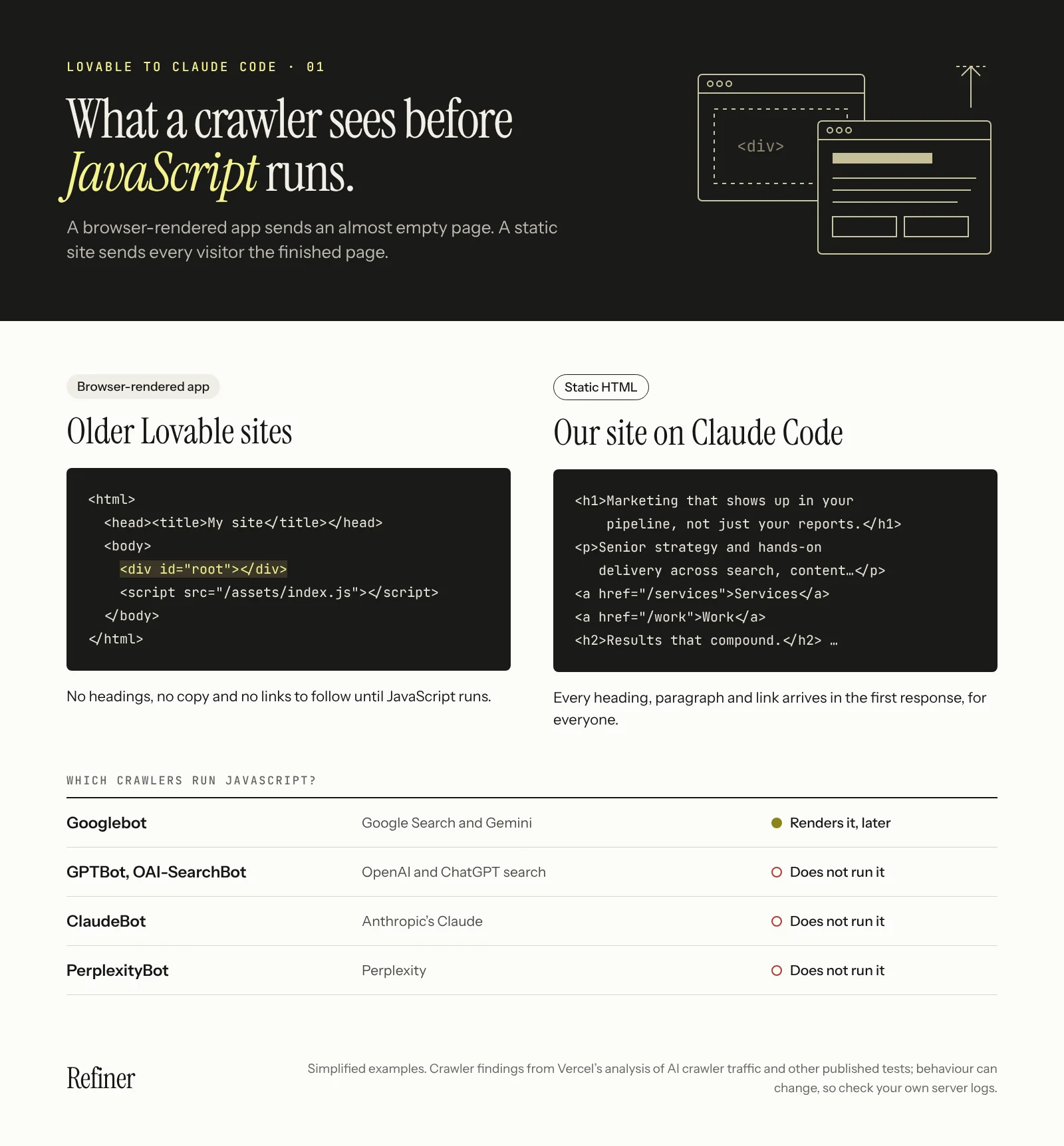
Like most Lovable sites built before May 2026, ours was a single-page app rendered in the browser. The server sends a near-empty HTML page and a bundle of JavaScript, and the browser builds the page. People never notice. A crawler that does not run JavaScript sees almost nothing: no headings, no copy, often no links to follow.
That matters more now than it did a few years ago. Google renders JavaScript, though it is a slower, less dependable route to being indexed than plain HTML. The crawlers behind ChatGPT, Claude and Perplexity are a different story. Vercel's analysis of AI crawler traffic found that none of the major AI crawlers it studied, including OpenAI's and Anthropic's, executed JavaScript: some fetched the files but never ran them. Other published tests report the same for Perplexity's crawler. For a business that wants to be found and quoted in AI answers, content that only exists after JavaScript runs may never be read.
Lovable recognised the problem. On 13 May 2026, it shipped its answer. New apps are now built on TanStack Start with server-side rendering, so pages arrive as complete HTML. Older React and Vite projects get pre-rendering instead: Lovable generates an HTML snapshot and serves it to verified search engines, social preview bots and supported AI crawlers, while people still get the browser-rendered app. Older projects can also be upgraded to the new stack.
For us, it was too little, too late, and it still leaves real problems for a site that lives on search:
- 01Pre-rendering is a patch, not a fix. People still get a JavaScript app, and only crawlers Lovable verifies get the HTML snapshot.
- 02Lovable's own documentation notes that third-party SEO scanners and other unverified agents still see the single-page app. The tools you use to audit your site may not see what Google sees, so you cannot easily check your own SEO.
- 03At launch, independent testing by at least one SEO tool vendor found legacy apps that were not being pre-rendered at all.
- 04Getting full server rendering on an older project means moving it to a new framework, TanStack Start. Lovable says that does not need a rebuild, but it is still a change of framework to check carefully.
If you are going to migrate anyway, it makes sense to migrate to something you control.
Why Lovable got expensive, and worse
Lovable charges in credits. Plans start from around $25 a month on Pro, with a monthly credit allowance, and every change you ask for uses credits. Run out and you top up or move to a bigger plan, and apps hosted on Lovable's own cloud add usage costs on top.
In practice it was worse than the price list suggests. As our site grew, each request used more credits than the last, while the quality of what came back went down. Changes that should have been simple took several attempts, and every attempt cost credits. Paying more for each change and getting less reliable work in return is what put us off Lovable for good.
That model suits a burst of building. It does not suit a marketing website that changes often: a new case study, a corrected figure, a better headline, a redirect. Each small fix cost credits, and the bill grew with every improvement we wanted to make. With Claude Code, the changes happen in our own code, and the site itself is static files on Cloudflare.
Why Claude Code was the better home
Search, cost and quality started the move. What made Claude Code the right place to land was ownership: the site is now a codebase in our own repository, built with the framework we chose and hosted where we chose. We ask for changes in plain English, Claude Code makes them, builds the site and checks the result, and nothing goes live until we have reviewed it and merged it. Every change is recorded in Git, so anything can be undone.
What we built with Claude Code, step by step
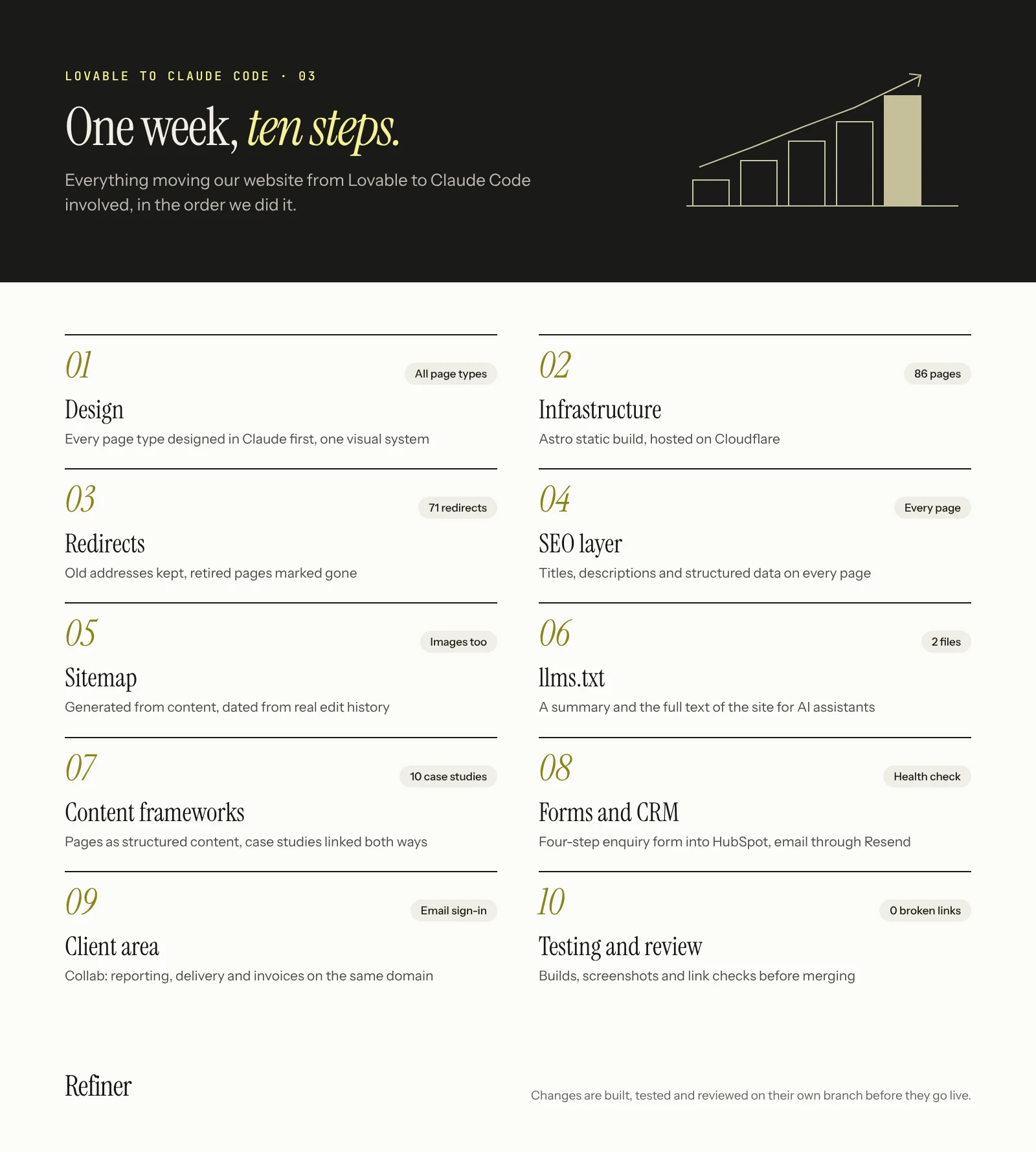
This is what the move actually involved, in the order we did it. The whole migration took a week. It moved that quickly because the design was settled first and every step was checked before the next one started.
1. Design
We designed every page type in Claude first: the home, about, services, industries, who we help, work, credentials, insights, sectors, founder and contact pages, plus templates for service, industry, role, case study and article pages, and the mobile navigation. Designing in one place gave us a single visual system before any code was written: Instrument Serif for headings, Instrument Sans for body text, JetBrains Mono for labels, and our yellow accent on alternating light and dark sections.
Claude Code then turned those designs into the site. Rather than rebuilding each page by hand, it wrote a small renderer that converts the designs into finished HTML at build time, keeps the interactive parts (filters, menus, the start a project form) working in the browser, and maps each design to its web address automatically. Fonts are hosted with the site rather than loaded from Google. The result is the best-looking site we have had: designed properly first, then built to match, page for page.
2. Infrastructure
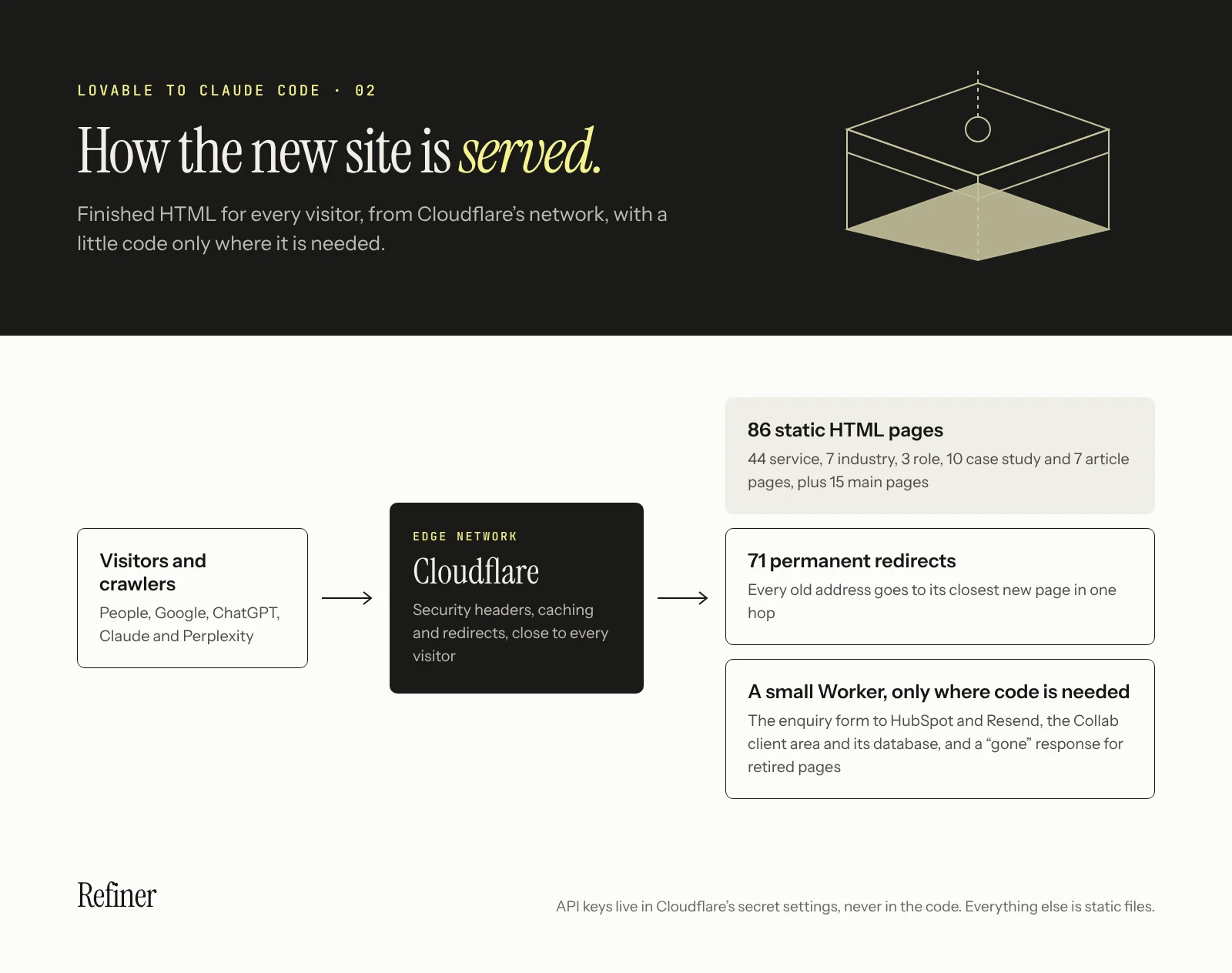
The site is built with Astro as static HTML: 86 public pages, each a finished file before anyone visits. Addresses keep the same format as our old ones, with no trailing slash.
It runs on Cloudflare. Static pages are served straight from Cloudflare's network, and a small Worker runs only for the parts that need code: the enquiry form, our client area and the old addresses we retired. Security headers and caching rules live in the project, so browsers can keep fingerprinted files for a year, and API keys live only in Cloudflare's secret settings, never in the code.
3. Redirects and URL history
We kept every old address working with 71 permanent redirects, each in a single hop to the closest new page, including old service, industry and blog URLs. Old blog category and tag pages we removed on purpose return a clear "gone" response, so search engines drop them instead of retrying. When we renamed our client area, the old addresses were redirected the same day.
4. The SEO layer
Every page has its own title and description, kept in one file so they can be reviewed together. Every page also carries structured data: the organisation, the website, services, articles, FAQs, breadcrumbs and the author. Social sharing tags give each page a proper preview, and the HTML is the same for every visitor and crawler.
5. Sitemap
The XML sitemap is generated from the site's content, so a new page appears in it automatically. Its last-modified dates come from the real edit history in Git, not from the date of the build, so search engines are told a page changed only when it actually did. A service page's date also moves when a case study it shows is updated. Article images are listed for image search, robots.txt points to the sitemap, and there is a readable sitemap page for people too.
6. llms.txt for AI assistants
We publish llms.txt, a plain-text summary of who we are, our key results and every page on the site, and llms-full.txt, the full text of every service, industry, role, case study and article in one file. Both are generated from the same content as the site, so they are never out of date.
7. Content frameworks
The words now live apart from the design. Each service, industry, role and case study is a structured content file, and each article is a Markdown file with its date, reading time and citation. Templates turn those files into pages, with sections, statistics, quotes, tables, FAQs and "what we delivered" lists.
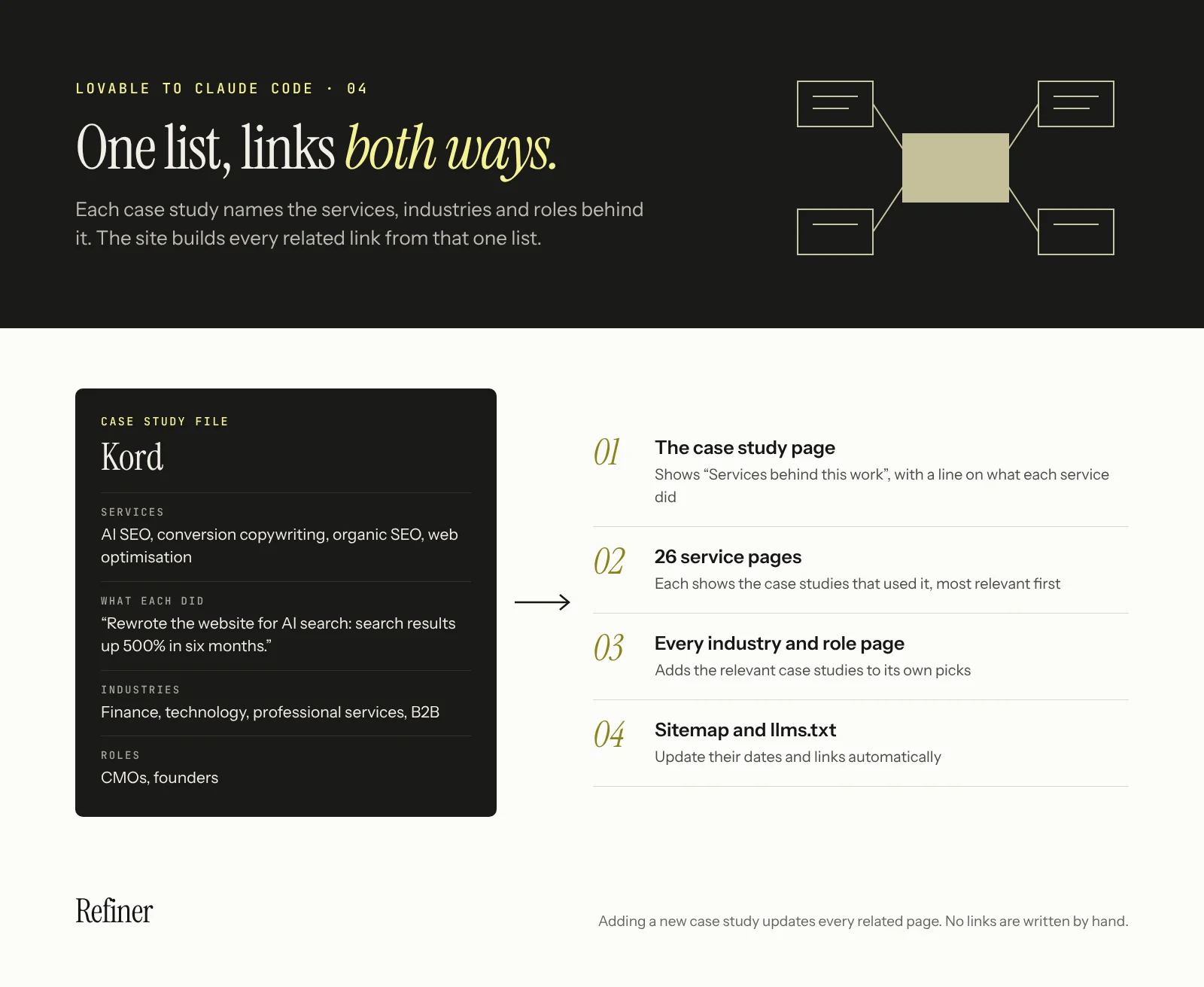
Our six newest case studies follow one framework: the client and their market, the challenge, the work in detail, the results and the engagement dates. Every case study also lists the services, industries and roles it relates to. From that one list, the site builds the links in both directions: a case study shows the services behind it, with a line on what each did for that client, and each service, industry and role page it lists shows it in return. Ten case studies now link into 26 service pages and every industry and role page, and adding a new one updates them all.
8. Forms, CRM and email
Our start a project form is four short steps. Enquiries are sent to HubSpot with the brief attached as a note, transactional email goes through Resend, and a health check tells us at a glance whether the form, the CRM and email are connected.
9. A client area on the same domain
Collab, our client area, lives at the same address as the website and in the same codebase. Clients sign in with a one-time email link rather than a password, and see their reporting, delivery, requirements and invoices. Reporting can include Google Analytics and Search Console data for each of a client's websites. New enquirers get their own space too, where they can book their first meeting.
10. Testing and review
Every change was built and tested before it reached us. Claude Code ran the site locally, opened pages in a headless browser to check them on desktop and mobile, took screenshots, and checked links: one check covered all 159 new links between case studies and service pages, with none broken. Each piece of work went onto its own branch with a summary of what changed, and we merged it when we were happy. The site has had more than 100 recorded changes so far, each reviewed before it was merged.
The results so far: up 400% in a week
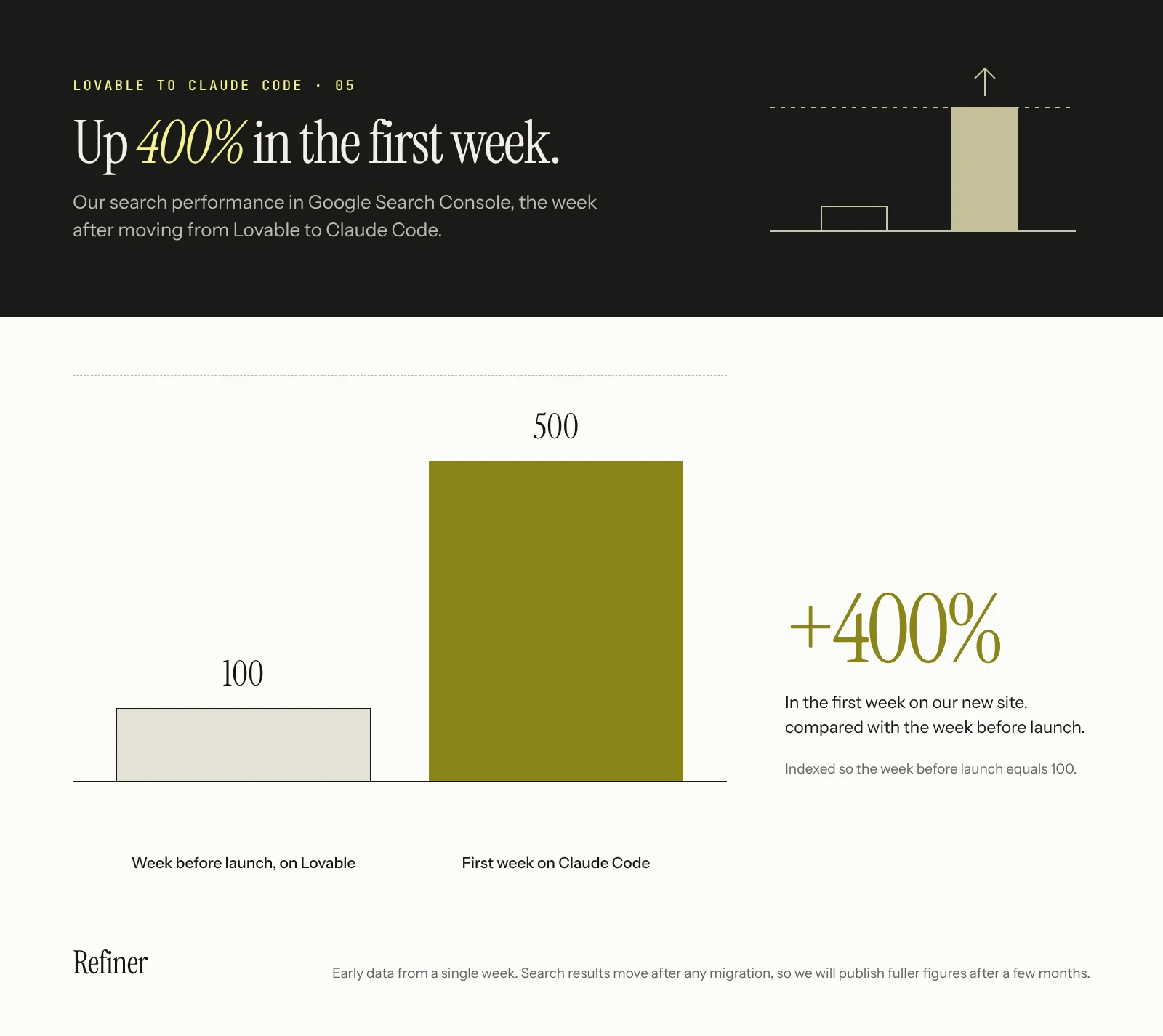
In the first week after launch, our search performance in Google Search Console was up 400% on the week before. We think three things are behind it: Google can read every page in full, every old address redirects to the right new one, and the sitemap tells search engines exactly what changed and when.
One week is early, and search results move around after any migration, so we are treating this as a strong start rather than a final number. We will publish the fuller picture, including impressions, clicks, AI referrals and enquiries, once there are a few months of data.
Should you move off Lovable?
If your website needs to rank, the answer is usually yes. Lovable still has a place for prototypes and signed-in apps.
| Your situation | Our suggestion |
|---|---|
| An app or dashboard behind a login | Lovable is fine. Search engines do not need to read signed-in screens. |
| A marketing site where search and AI visibility drive enquiries | Move. Build a site you own with Claude Code, so every page is finished HTML. |
| An older Lovable site relying on pre-rendering | Move, or at least check what crawlers and your SEO tools actually receive. |
| Credit bills rising as you make changes | Move. With Claude Code, changes happen in your own code, not against a credit allowance. |
| Dozens of service, case study or article pages | Move the content into structured files, then rebuild the templates. |
| Many old URLs with links pointing at them | Plan redirects first. This is where migrations lose the most value. |
How to migrate from Lovable to Claude Code, step by step
This is the process we recommend, based on what worked for us and what we would do differently next time. Each step includes the kind of request to give Claude Code. You do not need to write the code yourself, but you do need to review what comes back.
1. Get your code out of Lovable
Connect your Lovable project to GitHub so the code and assets live in a repository you control. Even if you rebuild everything, the old project is your reference for content, design and routes.
2. Open the project in Claude Code
Start Claude Code in that repository, from the terminal, the desktop app or the browser. If you are not comfortable in a terminal, the desktop app and the web version work on the same project.
3. Write your house rules in CLAUDE.md
Before any building, add a CLAUDE.md file with the rules every change must follow: British or American English, your brand terms, your URL format, where content lives, what must never be changed without asking, and how to check work before handing it back. We did not start with one, and it is the first thing we would add next time. It stops you repeating yourself and keeps every session consistent.
4. Audit what you have
Ask Claude Code to list every route in the app, and every URL from your sitemap, Search Console's page indexing report and your analytics landing pages. Then ask it to fetch each page type without running JavaScript and report what a crawler receives. This list is your migration contract: every address on it must end up somewhere sensible.
5. Agree the plan before any code
Ask for a migration plan first, not code: the framework, the page types, where content will live, how forms will work and how redirects will be handled. For a marketing site, static generation is usually right. Choose server-side rendering only for pages that genuinely change per visitor. Read the plan, push back, and only then say go.
6. Move content out of components
Ask Claude Code to extract every page's words into structured files: one file per service, case study or article, with fields for title, description, headings, statistics and FAQs. This is the slowest step and the one that pays back fastest, because every later change becomes an edit to a content file.
7. Rebuild the templates
We designed our pages in Claude first, then had Claude Code turn each design into a template that reads those content files: home, service, industry, case study, article and so on. Keep your design during the move. Changing design and platform at the same time makes it hard to tell what caused any change in results.
8. Build the search layer
Ask for a unique title and description for every page, canonical addresses, structured data for each page type, a sitemap generated from your content with honest last-modified dates, deliberate robots rules and, if AI visibility matters to you, an llms.txt file.
9. Map every old URL
Give Claude Code your old URL list and ask for a redirect map: each old address to its closest new page, in a single hop, with "gone" responses for pages you removed on purpose. Then ask it to test every line. Check the map yourself as well, because the closest page is a judgement call.
10. Host it and reconnect everything
Deploy to your host, then reconnect what the old site did: enquiry forms and the CRM they feed, analytics with proper consent, booking links and email capture. Keep API keys and passwords in your host's secret settings, never in the code or in a chat.
11. Test before you switch
Ask Claude Code to build the site and check it end to end: fetch every URL from your audit and confirm it loads or redirects, confirm the content is in the HTML, take screenshots of each page type on desktop and mobile, check for broken links and submit every form once. Look at the screenshots yourself.
12. Launch, then watch for eight weeks
Merge, switch the domain, submit the new sitemap in Search Console and watch the page indexing report, crawl errors and impressions weekly. Rankings can move for a few weeks after any migration. Fix 404s as they appear, and keep the redirects in place for good.
What we learned in a week
Moving a whole site in a week was a big learning process. Working with an AI that can change your entire website is powerful, and most of what we learned was about using that power well. These habits made the difference.
- 01Design first, build second. Settling every page in a design before writing code meant the build was about getting things right, not deciding what they should be.
- 02Write your rules down from day one. We did not start with a CLAUDE.md file, and some corrections came up more than once as a result.
- 03Review every change before it is merged. Read the summary, look at the screenshots and open the page.
- 04Check facts as carefully as code. A confident sentence can still be wrong. During the move we found that our site described one client's business incorrectly, and we only caught it by checking the copy against the source.
- 05Ask for one change at a time, on its own branch, so each one is easy to review and easy to undo.
- 06Never paste passwords or API keys into a prompt. Put them in your host's secret settings.
Is Lovable bad for SEO?
For a marketing website, in our experience, yes. Lovable sites built before May 2026 are rendered in the browser, so crawlers that do not run JavaScript, including the ones behind ChatGPT and Claude, get an almost empty page. Lovable now pre-renders older apps for crawlers it verifies and server-renders new ones, but the fix is recent, your own SEO tools may still see the unrendered app, and full server rendering means upgrading the project. A static site gives every visitor and every crawler the same finished page.
Is Claude Code cheaper than Lovable?
For us, yes. Lovable bills in credits that every change uses up, plus top-ups and hosting usage, and our requests were using more credits over time while the output got less reliable. With Claude Code, the cost is a Claude subscription or API usage, and static files are cheap to host. Your numbers depend on how often you change your site and where you host it.
Do I need to be a developer to use Claude Code?
No, but it helps to be comfortable reviewing changes. Claude Code writes and tests the code, and the desktop and web apps mean you do not need a terminal. You still need to read what it proposes, check the result in a browser and decide what goes live. If you have a developer, involve them in the plan and the first reviews.
Can I still use Lovable for prototypes?
Yes. It is a fast way to test an idea or a page layout. Just do not build the website you need to rank on it.
How long does a migration from Lovable to Claude Code take?
Ours took a week, for 86 pages. It depends far more on the number of pages and the state of your content than on the code, which Claude Code writes quickly. A small site with settled design and copy can move in days. A site with dozens of pages, years of URLs and content buried in components needs time for the URL audit, the content move and testing, and those are the steps not to rush.
Lawford, A. (20 November 2026). Why we moved our website from Lovable to Claude Code, and how to do it. Refiner Agency. https://refineragency.com/insights/lovable-to-claude-code-migration-guide