
A website migration isn't finished on launch day. Two days after publishing why we moved our website from Lovable to Claude Code, we watched how people actually used the new site, and found eight things worth fixing. Some were about search. Most were about what happens after someone arrives: whether they get in touch, and what happens when they do.
Google's own guidance on site moves says to keep monitoring traffic on both the old and the new addresses after you switch. This checklist is what that looked like for us. Each item has what we found, what we changed, and what to check on your own site.
Because the site is now code we own, each fix went live the same day: 22 changes in two days, each built and tested by Claude Code and reviewed before it went live. Most started as a one-line message, quoted at the top of each section.
In this article · 14 sections
- 01The post-migration checklist at a glance
- 02How to make sure every enquiry gets a fast, personal reply
- 03How we built our own CRM with Cloudflare and Resend
- 04How to let visitors book a call without another email
- 05How to stop losing half-finished form enquiries
- 06How to make every call to action say the same thing
- 07How to turn an article's readers into enquiries
- 08How to measure your website without cookies
- 09How to find and fix 404s after a website migration
- 10How we work with Claude Code after launch
- 11What does a post-migration checklist need to cover?
- 12How long should you monitor a site after migrating?
- 13Can you run website analytics without cookies?
- 14Can Claude Code build a CRM?
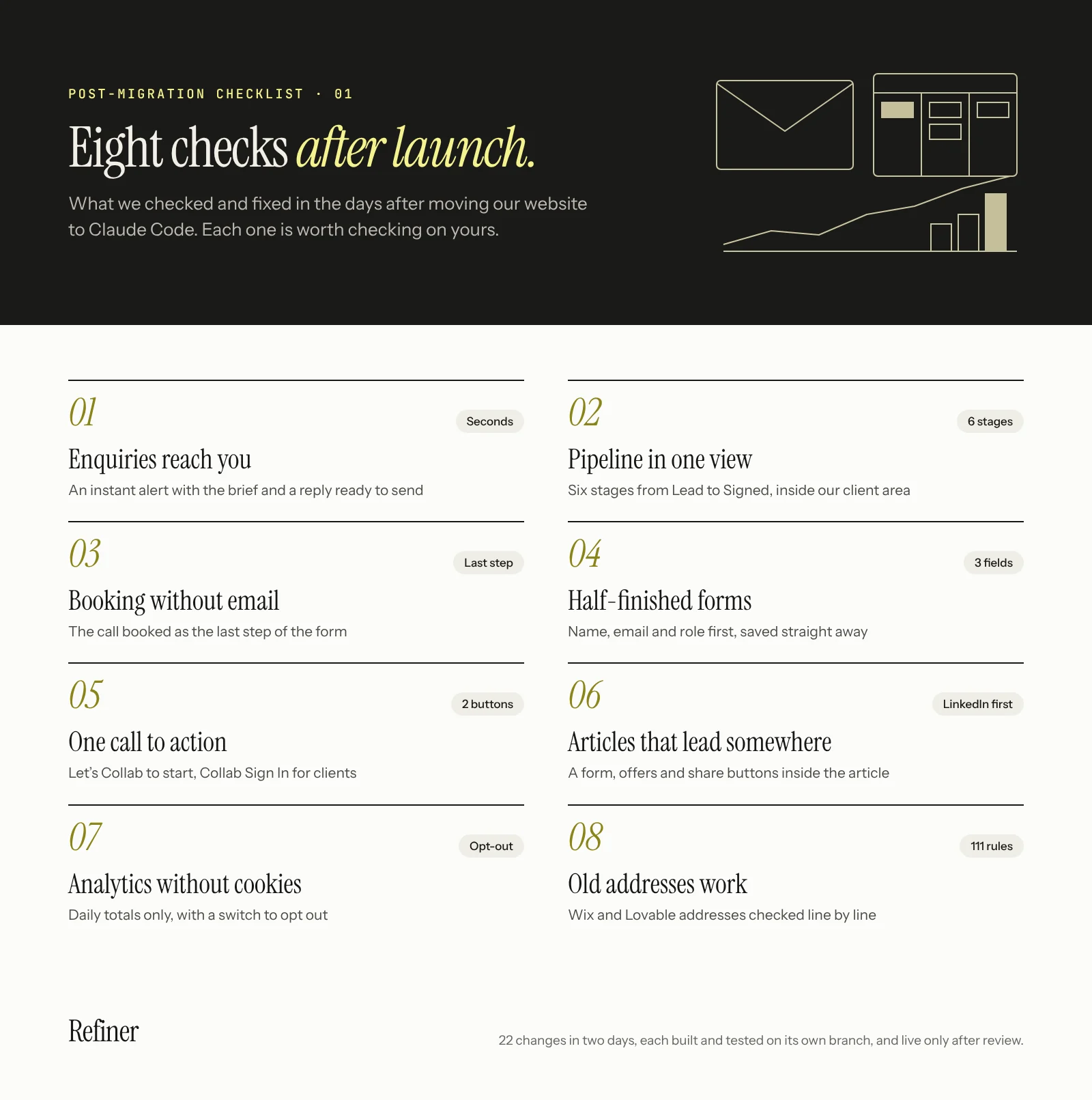
The post-migration checklist at a glance
| Check | What we found | What we changed |
|---|---|---|
| 1. Do enquiries reach you with a next step? | Briefs landed in an inbox with no reply ready | An instant alert with a suggested reply |
| 2. Can you see where every prospect is? | Connecting HubSpot meant paying for API access | Our own CRM on Cloudflare and Resend |
| 3. Can people book a call without emailing? | Booking took another round of email | The calendar as the last step of the form |
| 4. Does your form capture people who stop halfway? | About 2,000 visitors in a day, very few starting the form | Name, email and role first, saved straight away |
| 5. Does every button say the same thing? | Different words for the same action | One "Let's Collab" call to action |
| 6. Do your articles lead anywhere? | Readers reached the end with nowhere to go | A form, offers and share buttons inside the article |
| 7. Can you measure without cookies? | Analytics that could not answer basic questions | A cookie-free dashboard, with a switch to opt out |
| 8. Do old addresses still work? | Hundreds of "not found" responses | Redirects for two old websites, tested line by line |
How to make sure every enquiry gets a fast, personal reply
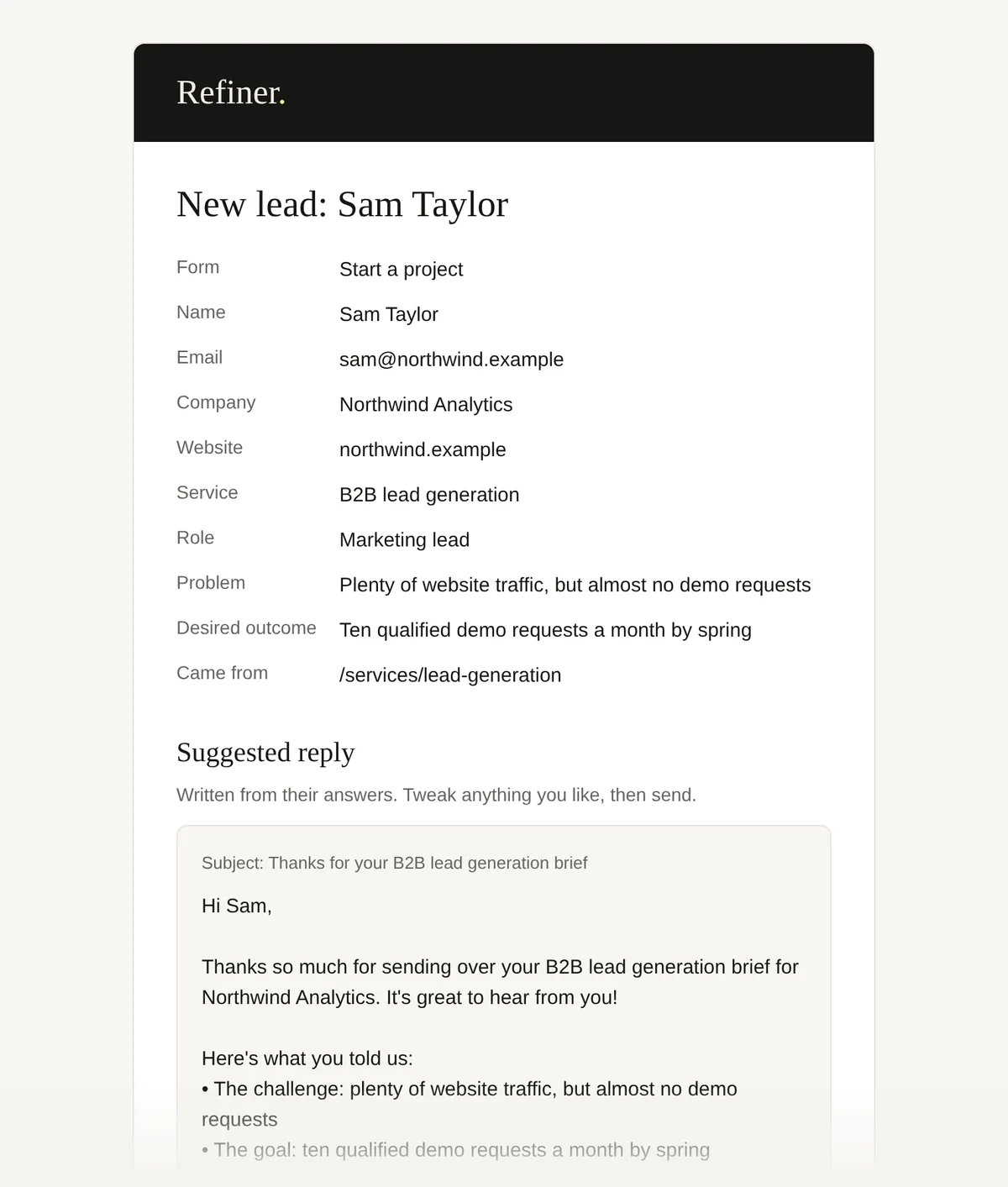
“How can I get a lead pushed to my email when someone sends a brief? Can we also give a suggested reply?”
When someone sends a brief through our start a project form, the team gets an email through Resend within seconds. It shows who they are, what they told us, and a suggested reply written around their brief: the problem, the outcome they want and a link to book a call. We adjust it and send it ourselves. The enquirer gets an automatic email of their own, which plays back their brief and explains how to sign in to their own space in Collab, our client area.
We briefly merged the two into one template. It was a mistake. The automatic email confirms and orients. The personal reply starts a conversation, and it should sound like someone who has read the brief. Keeping enquiries, contacts and replies joined up is the core of CRM integration.
What to check on your site
- 01Send a test enquiry. How long until someone on your team knows about it?
- 02Does the alert include everything needed to reply, without opening another tool?
- 03Does the person who enquired get a clear next step within minutes?
An automatic email confirms an enquiry. A personal reply starts a conversation. Don’t let one template do both jobs.
How we built our own CRM with Cloudflare and Resend
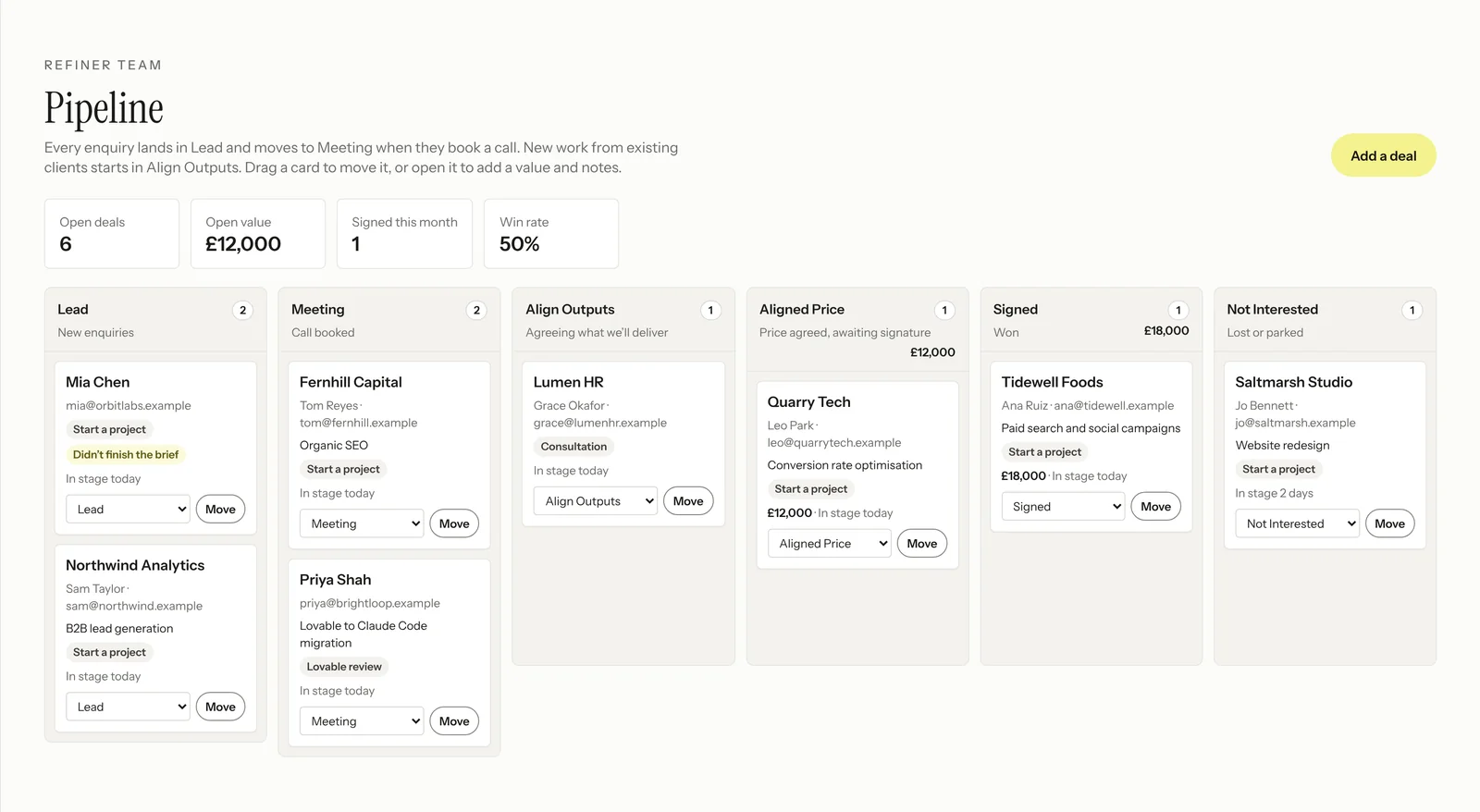
“In the admin, set up a lead funnel like HubSpot's, showing where prospects are: Lead, Meeting, Align Outputs, Aligned Price, Signed, Not Interested.”
The plan was to send every enquiry to HubSpot. Connecting the site to it needed API access that, on our plan, meant paying for an upgrade. So we built our own CRM instead, on the Cloudflare and Resend accounts the site already uses: enquiries and deals are stored in a Cloudflare database, every email goes out through Resend, and the board lives in Collab, our client area. There is no extra subscription and no per-seat fee, and it works exactly the way we sell.
Every enquiry now becomes a deal on a board with those six stages. New work from an existing client starts at Align Outputs, because there is no first meeting to book. Each deal shows the brief and has a button to resend the sign-in email. We still use HubSpot's booking calendar for calls.
We also built a sync with Google Calendar that moved a deal to Meeting when a call appeared. A few hours later we removed it. At our volume, moving a card takes two seconds, and the sync was one more set of keys to look after and one more thing that could break. Design the funnel first, and automate a step when doing it by hand starts to cost you.
What to check on your site
- 01Can you say, today, how many prospects are waiting for a reply or a proposal?
- 02Do enquiries from every form end up in the same place?
- 03Is there an automation you maintain that would take seconds to do by hand?
When connecting HubSpot meant paying for API access, we built our own CRM on Cloudflare and Resend instead. No extra subscription, no per-seat fee.
How to let visitors book a call without another email
“Add the meeting booking as the final step in the form.”
The form now ends with our booking calendar, so someone who has just described their problem can pick a time straight away. The calendar loads only at that step, so every other page is as fast as before. Removing a step between interest and a conversation is basic landing page optimisation.
What to check on your site
- 01Count the steps between "I'm interested" and a booked call. Can you remove one?
- 02Do third-party widgets load on pages where nobody uses them?
How to stop losing half-finished form enquiries
“Why is no one engaging with the form? Make it way simpler: start with first name, email and role, save it, then do the steps.”
In the site's first full day we had about 2,000 visitors, and very few of them started the form. The first step asked people to choose a service before telling us anything about themselves. That is a decision, and a decision is a reason to leave.
Step one now asks for three things: first name, work email and role. They are saved the moment the visitor continues. Then come the service, the problem, the outcome they want and the call. If someone stops after step one, we still know who they are, and the pipeline marks the brief as unfinished so we can follow up. When a service page sends people to the form, the service is filled in and that step is skipped. This is the kind of fix conversion rate optimisation is made of: small, measurable and fast.
What to check on your site
- 01What does your form's first step ask for? Is it a decision or a detail?
- 02If someone stops halfway, do you keep anything at all?
- 03Do you ask for information you already know, such as the page they came from?
Ask for the name and email first, and save them straight away. A half-finished brief with an email address is still a lead.
How to make every call to action say the same thing
“Change every Start a project button to Let's Collab.”
Buttons used different words for the same action. Now every invitation to work with us says "Let's Collab" and goes to the same form, and the header button always says "Collab Sign In" for clients. Consistent wording is a small part of conversion copywriting with an outsized effect.
What to check on your site
- 01List every button that leads to a sales conversation. How many different labels do they use?
- 02Can an existing client find the way in without scrolling?
How to turn an article's readers into enquiries
“Create a custom form for this blog post, and a social sharing tool: LinkedIn, X and Facebook.”
Our migration article was being read, but readers reached the end with nowhere obvious to go. We added a free migration review form inside the article, short offers at the two points where readers are most likely weighing a move of their own, and share buttons with LinkedIn first. Highlighted takeaways, like the ones in this article, can be shared on their own with the link attached. Content marketing only pays if someone can act on it.
What to check on your site
- 01Does each article end with a next step that matches what it is about?
- 02Can readers share a single line, not just the whole page?
How to measure your website without cookies
“Make the analytics dashboard 10x more powerful.”
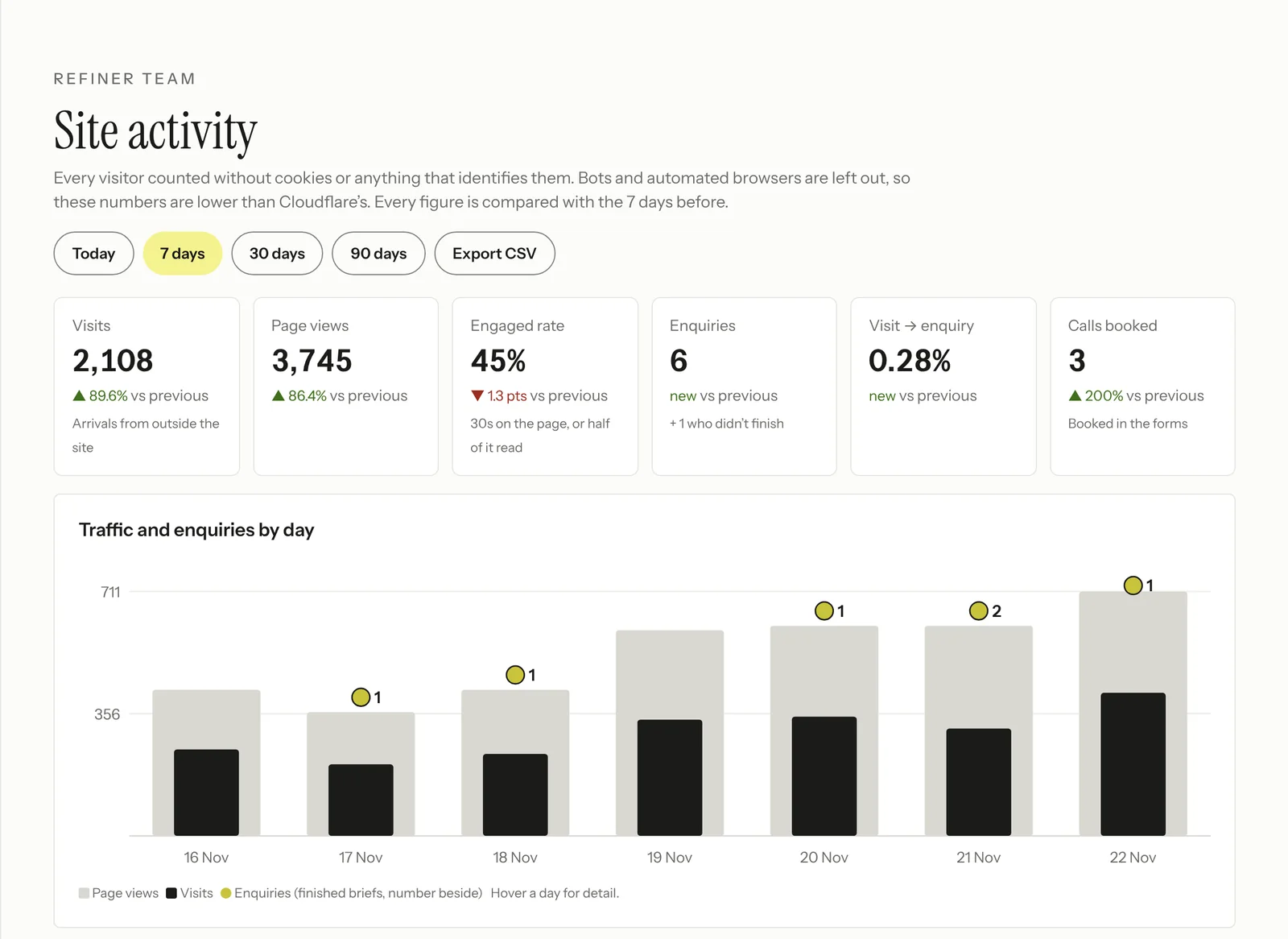
Our site counts its own visits without cookies and without storing anything that identifies a person. Each page sends a small anonymous signal, and we keep only daily totals: pages viewed, where visits came from, the type of device, the country and how far people read. The dashboard answers the questions we actually ask:
- 01Did people engage? A view counts as engaged after 30 seconds, or when half the page is read. It replaces bounce rate.
- 02Where did visits come from? Search, social, email, referrals, campaigns and AI assistants such as ChatGPT, Perplexity, Claude and Gemini, including apps like LinkedIn's.
- 03Which pages lead to enquiries, and where do people drop out? A table of every page, and funnels for each of our main forms.
- 04What is broken? Addresses people tried that showed "Page not found".
It is conversion tracking built around enquiries rather than clicks. On day one the daily chart was blank, because visits had only started being counted that morning. It now shows page views going back to launch, so a new measure never leaves a chart empty. A good analytics dashboard shows what you have, not what you wish you had.
The rules matter here. Under the ICO's current guidance on storage and access technologies, analytics can run without consent under the "statistical purposes" exception, if its only purpose is aggregate statistics to improve your site, you explain it clearly, and you give people a simple, free way to object. A double check found we explained it but had no way to object. Our cookie policy now has a switch to stop counting your visits, and browsers sending a Global Privacy Control signal are not counted either. Check the guidance against your own setup.
What to check on your site
- 01Does your analytics count visitors who decline cookies, or only those who accept?
- 02Can you see which pages lead to enquiries, not just which get views?
- 03If you rely on an exception to consent, can visitors actually object?
You don’t need cookies to know which channels send you enquiries. Keep daily totals, explain it, and give people a way to opt out.
How to find and fix 404s after a website migration
“Here are the status codes. What can we improve? Make sure the old site's list is 100% accurate.”
Cloudflare's dashboard shows the status code of every response. Ours showed more than 500 "not found" responses and over 200 "forbidden" ones. Our website has lived on Wix, then Lovable, and now Claude Code, and each move left addresses behind.
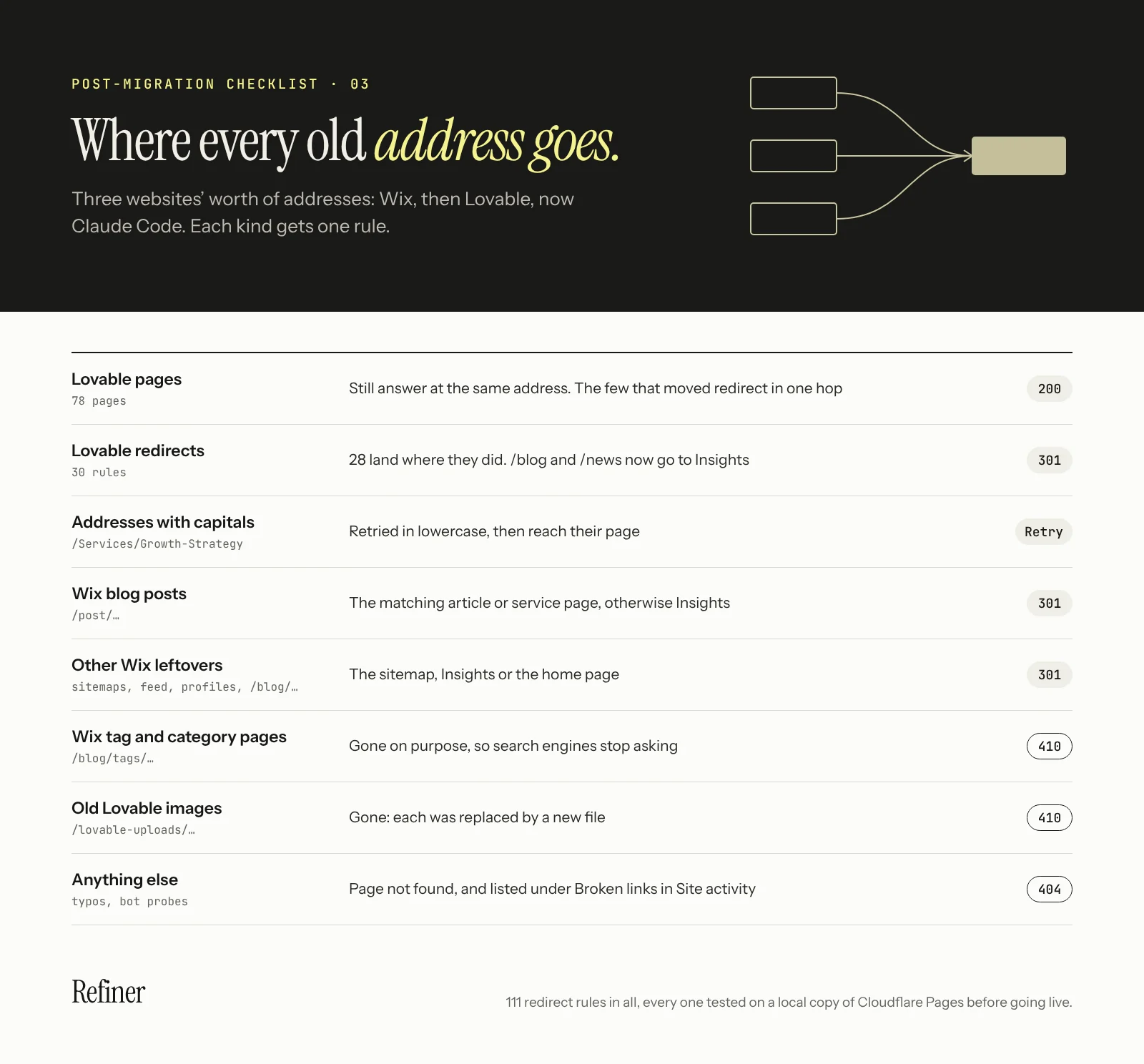
We gave Claude Code the full list of pages and redirects from the Lovable site and asked it to check every one against the new site. Every Lovable page still works, and 28 of its 30 redirects land where they did. The other two now go to Insights, which did not exist before. Then it closed the gaps:
- 01Capital letters. Lovable treated /Services/Growth-Strategy as the same page as /services/growth-strategy. Cloudflare does not. Our "Page not found" page now retries an address in lowercase.
- 02Wix leftovers. Wix's sitemap files, blog feed, member profiles and blog pages now redirect. Its old tag and category pages, and images uploaded to Lovable, answer "gone", which Google recommends for content you did not move.
- 03Our own links. Topic links on Insights ended in a slash, which cost every click a redirect. They now point straight at the page.
- 04Bots. Most "forbidden" responses are Cloudflare blocking bots. Check its AI crawler settings, so you are not also blocking the AI search crawlers you want to be found by.
Every one of the site's 111 redirect rules was tested on a local copy of Cloudflare Pages, and the capital letters in a real browser. A double check found three more addresses that failed with a trailing slash, fixed before anything went live. Google says permanent redirects don't lose PageRank, so a complete redirect map protects your organic search more than almost anything else in a move.
What to check on your site
- 01Filter your host's status codes by 404 and look at the addresses behind them.
- 02Test every old page and redirect, with and without capital letters and a trailing slash.
- 03Make sure removed content returns 404 or 410, not a redirect to the home page.
- 04Check your bot settings aren't blocking AI search crawlers.
A migration isn’t finished at launch. Check your status codes in the first week: every 404 is a visitor, or a search engine, you are losing.
How we work with Claude Code after launch
A few habits made two days of changes safe to ship:
- 01Ask it to rate its own work. "Rate this out of 10" gets an honest score and a list of what would make it a 10. "Update" gets those changes made. It scored its own first fix for our status codes at 5 out of 10, and it was right.
- 02Ask for a double check. A second pass, with fresh tests, found the missing opt-out and the three trailing-slash addresses.
- 03Nothing goes live without a yes. Every change sits on its own branch with a summary of what changed and how it was tested.
- 04Test on a copy of the real platform, in a real browser, on desktop and mobile, and keep API keys in Cloudflare's settings, never in a chat.
What does a post-migration checklist need to cover?
At least four things: that every old address redirects or returns a clear "gone", that search engines can crawl and index the new pages, that forms and enquiries still reach the right people, and that your analytics still works. Then watch real visitors for a week or two. Most of what we fixed only showed up on the live site.
How long should you monitor a site after migrating?
Watch it daily for the first week and weekly for at least two months. Status codes and broken links show up within days. Search rankings can take weeks to settle, because search engines need to visit every old and new address at least once.
Can you run website analytics without cookies?
Yes, if you count visits rather than people. Our site records anonymous daily totals and stores nothing on the visitor's device. In the UK, the ICO's statistical purposes exception can allow this without consent, as long as you explain it and give people a simple way to object. What you give up is following one person across visits.
Can Claude Code build a CRM?
Yes, a simple one that fits how you work. We built ours when connecting HubSpot meant paying for API access on our plan. Enquiries and deals live in a Cloudflare database, emails go through Resend, and a six-stage board sits inside our client area, with every website enquiry added automatically. It was built in a single session. For a small team that wants enquiries, briefs and client spaces in one place, that is enough. A larger sales team that needs forecasting or email sequences will still want a dedicated CRM.
“After moving our website to Claude Code, we made 22 changes in two days. Here's the post-migration checklist we wish we'd started with.”
Copy post gives you the takeaway and the link, ready to paste into LinkedIn.Lawford, A. (22 November 2026). Post-migration checklist: 8 fixes we made after moving to Claude Code. Refiner Agency. https://refineragency.com/insights/post-migration-checklist-claude-code