
This guide is for marketers and website owners who use Google Search Console and want to find the searches people make when they are comparing options. It covers one regex filter, how to read what it returns, and when to update a page or create a new one.
Comparison searches are worth finding because the people making them are close to a decision: they already know the category and are weighing named options. If Google shows your site for those searches and the page doesn't answer the comparison, you lose the reader at the moment they are choosing.
The example used throughout is our own Search Console data for refineragency.com: web search, the last three months in our export of 27 November 2026. Search Console lists the searches it can show, and hides very rare ones for privacy, so the figures are shares of the searches listed.
In this article
- 1. Defining a comparison search
- 2. Setting up the comparison search filter in Search Console
- 3. Sorting comparison searches by impressions
- 4. Finding the comparisons you nearly win
- 5. Updating the page that already ranks
- 6. Creating a dedicated comparison page
- Comparison searches in Search Console checklist
- Is the Search Console regex filter case sensitive?
- Why do comparison searches get impressions but no clicks?
- Should you create a comparison page for every competitor?
1. Defining a comparison search
A comparison search is one where the person names two or more options, or asks for options other than one they know. In B2B, they are usually a buyer who has a shortlist, or a customer looking to switch.
| Word in the search | What the person is doing | Example from our data |
|---|---|---|
| vs, versus | Weighing two named options | "abm vs abx" |
| alternative, alternatives | Looking for options to one they know | "uk alternatives to capchase, pipe and clearco" |
| compare, compared, comparing, comparison | Asking for a side by side view | "compare revenue-based financing companies in the uk" |
| instead of, replacement, better than | Looking for a substitute | "which small business loans charge a flat fee instead of interest?" |
| competitor, difference between, switch from | Researching the market or a move | "switching from an seo agency to an ai tool, what should i know?" |
2. Setting up the comparison search filter in Search Console
- Open Search Console and choose your property.
- Go to Performance, then Search results.
- Click Add filter, choose Query, and set the dropdown to Custom (regex) with Matches regex.
- Paste the pattern below and click Apply.
\b(vs|versus|compare|compared|comparing|comparisons?|alternatives?|competitors?|instead of|replacements?|better than|difference between|switch from|switching from)\bThe \b at each end is a word boundary, so "vs" matches "abm vs abx" but not a longer word that happens to contain those letters. The question marks make the final s optional, so "alternative" and "alternatives" both match. Search Console's filter uses RE2 syntax and isn't case sensitive by default, so you don't need to list capitalised versions.
Set the date range to the last three months so there is enough data to sort, and tick Average position as well as clicks and impressions.
3. Sorting comparison searches by impressions
Sort the Queries table by impressions, highest first. The top of the list is the comparisons people make most often while Google is already showing your site.
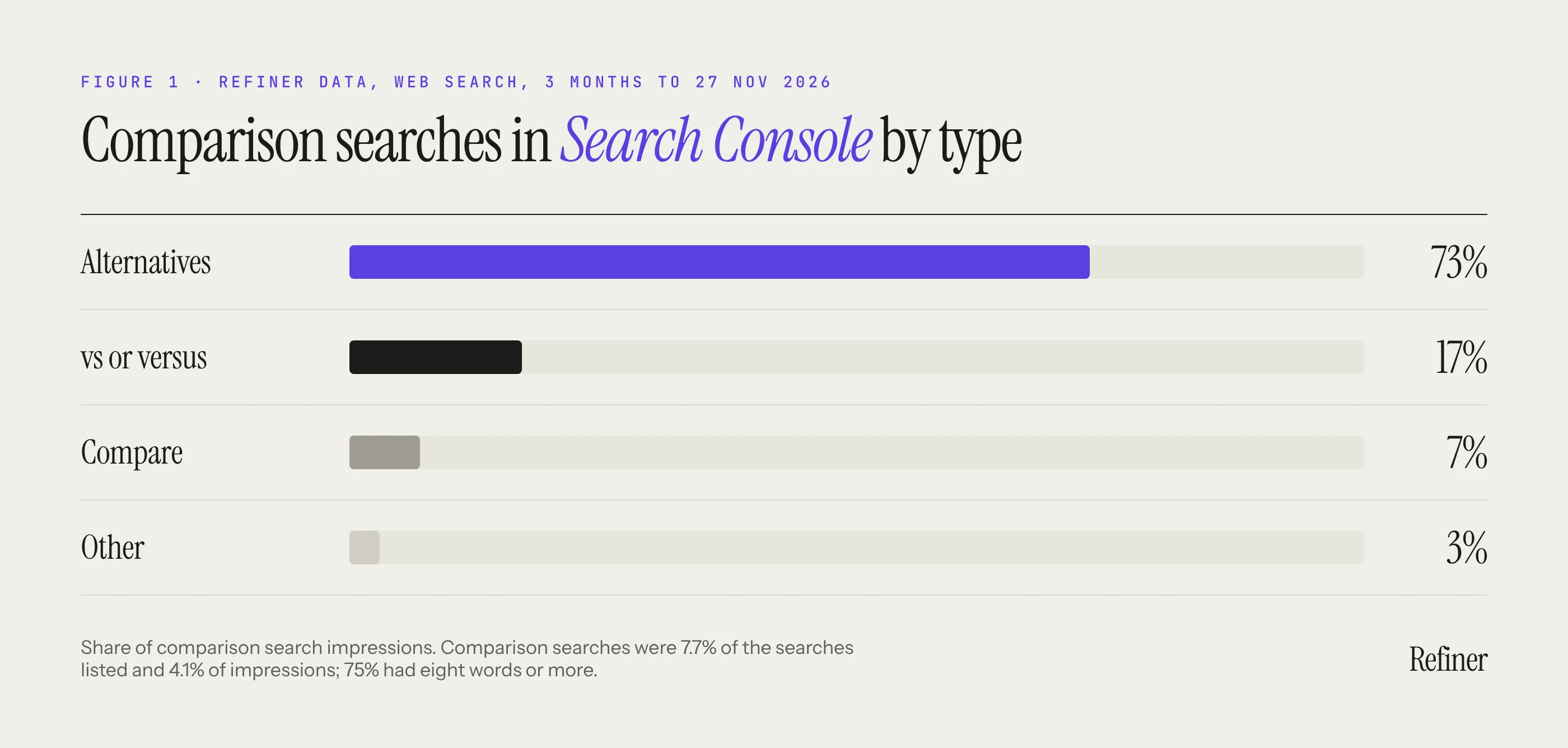
In our data, comparison searches were 7.7% of the searches listed and 4.1% of impressions. Most were long: 75% ran to eight words or more, and the average was ten. "Alternatives" searches dominated.
| Type of comparison | Share of comparison impressions |
|---|---|
| Alternatives | 73% |
| vs or versus | 17% |
| Compare | 7% |
| Other (instead of, switch from and similar) | 3% |
Most of our "alternatives" searches name UK revenue based finance lenders, such as Capchase, Pipe and Wayflyer, with the buyer's situation attached: "pipe alternatives for a uk edtech subscription business". That is the territory of our UK revenue based finance comparison.
4. Finding the comparisons you nearly win
Two groups of searches are worth acting on first.
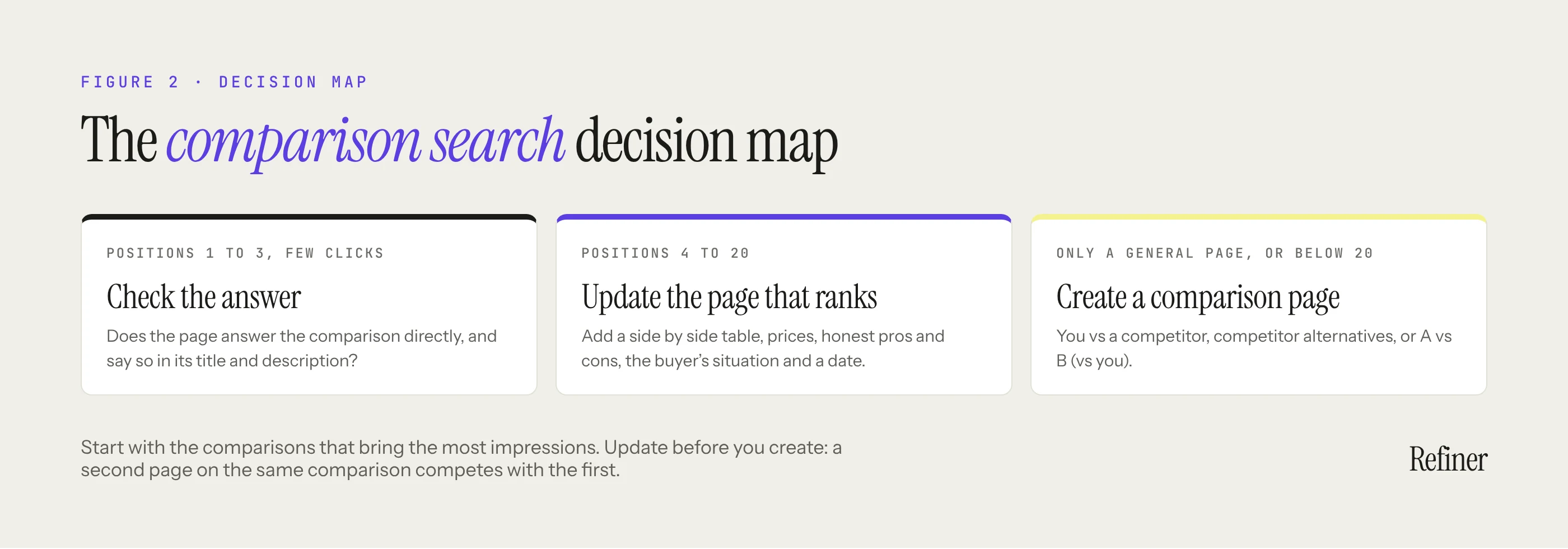
- Positions 4 to 20. Google already rates your page for the comparison but puts others above it. Better answers here can move a page into the top three. In our data, 15% of comparison impressions sat in this range, including "compare revenue-based financing companies in the uk" at around position 4.
- Plenty of impressions, very few clicks. The page appears but doesn't get chosen. Check the title and description against the search: does the snippet say it compares the options named?
Our data had a third pattern: 70% of comparison impressions came at positions 1 to 3, with almost no clicks. Search Console can't tell you why. Google counts clicks and impressions from AI Overviews and AI Mode within overall search traffic, so you can't separate them in this report. Treat high positions with no clicks as a prompt to check that the page answers the comparison directly, in a form an AI answer can quote and a reader will want to open.
5. Updating the page that already ranks
If a page already appears for a comparison, improve it before creating anything new. A second page on the same comparison competes with the first.
- Add a side by side table that names each option and compares them on what buyers ask about: cost, who it suits, what it doesn't do.
- Give prices, or say how each option charges and where to check.
- Write honest pros and cons, including where a competitor is the better choice. Readers can tell when a comparison is a sales page.
- Answer the situation, not just the names. Our lender searches add "for a uk edtech subscription business" or "for a saas company with £5m arr", so our comparison says which lenders fund which kinds of business.
- Date it. Prices and products change; a dated comparison is easier to trust and to keep current.
6. Creating a dedicated comparison page
If the only page ranking is a general one, or you rank below position 20, a page built for the comparison serves the reader better, in our view. There are three common formats:
- Your product vs a competitor, for searches that name you both.
- Competitor alternatives, for searches such as "capchase alternatives", where the reader has rejected or outgrown one option.
- Competitor A vs competitor B (vs you), for searches comparing two rivals, where you can be the third option.
Our example is "abm vs abx" and "abx vs abm", where we sit around positions 62 to 65. Our ABX article covers the difference inside a wider piece. A page answering the comparison head on, with a table and an honest view of when each approach fits, is the stronger candidate for those searches.
Comparison searches in Search Console checklist
- Add the comparison regex as a Custom (regex) query filter in Performance, Search results
- Set the last three months and show average position
- Sort by impressions and note the comparisons you appear for most
- List comparisons at positions 4 to 20, and those with impressions but few clicks
- Check each high ranking comparison page answers the comparison directly
- Update the page that ranks with a table, prices, honest pros and cons and a date
- Create a dedicated page where only a general page ranks, or you rank below 20
- Check the filter again in three months
Is the Search Console regex filter case sensitive?
No, the Search Console regex filter isn't case sensitive by default, according to Google's help page. It uses RE2 syntax, so word boundaries such as \b work, and you can add (?-i) at the start of an expression if you need case-sensitive matching. That means the comparison pattern catches "VS", "Vs" and "vs" without listing each one.
Why do comparison searches get impressions but no clicks?
Search Console can't tell you why comparison searches get impressions without clicks. Google counts AI Overviews and AI Mode within overall search traffic, so their impressions mix with normal results. In our data, 70% of comparison impressions came at positions 1 to 3 with almost no clicks, so we check that each page answers the comparison directly and says so in its title and description.
Should you create a comparison page for every competitor?
No. Create a dedicated comparison page only where Search Console shows real demand for that comparison and no existing page answers it well. Start with the comparisons that bring the most impressions, update pages that already rank before creating new ones, and keep each comparison honest, dated and specific to the buyer's situation.
“Search Console already shows which comparison searches find your site. One regex filter lists them: vs, alternatives, compare, instead of. Then update the page that ranks, or build a dedicated comparison.”
Copy post gives you the takeaway and the link, ready to paste into LinkedIn.Lawford, A. (27 November 2026). How to find comparison searches in Google Search Console. Refiner Agency. https://refineragency.com/insights/find-comparison-searches-search-console